





































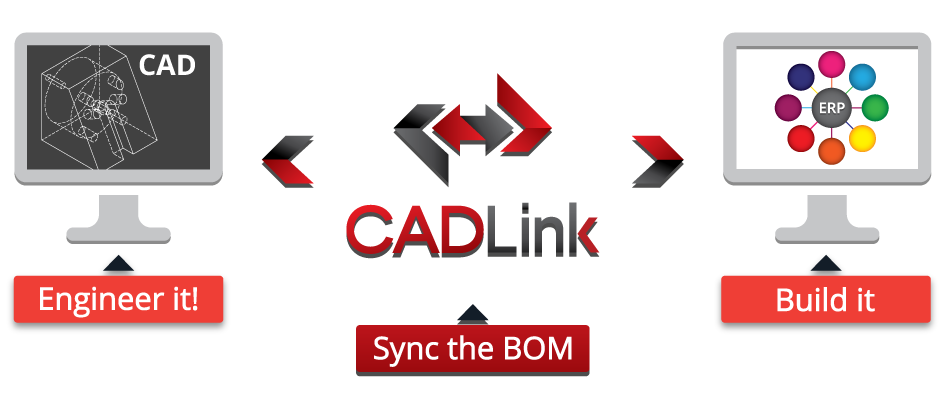
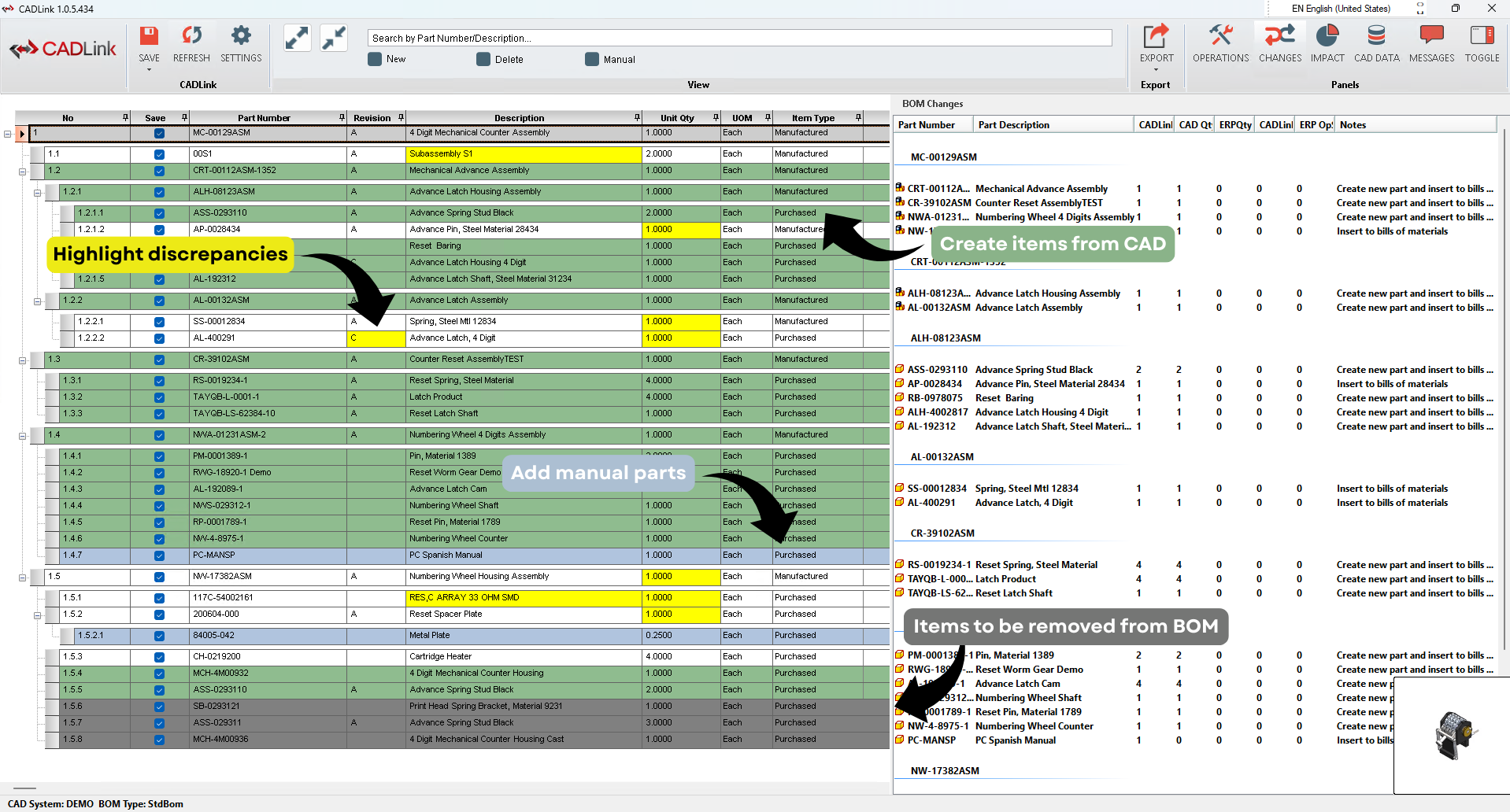
CADLink runs from your CAD system and takes data directly from the on screen drawing or model and integrates it with your ERP system.

CADLink Bidirectional CAD ERP BOM Sync Tool

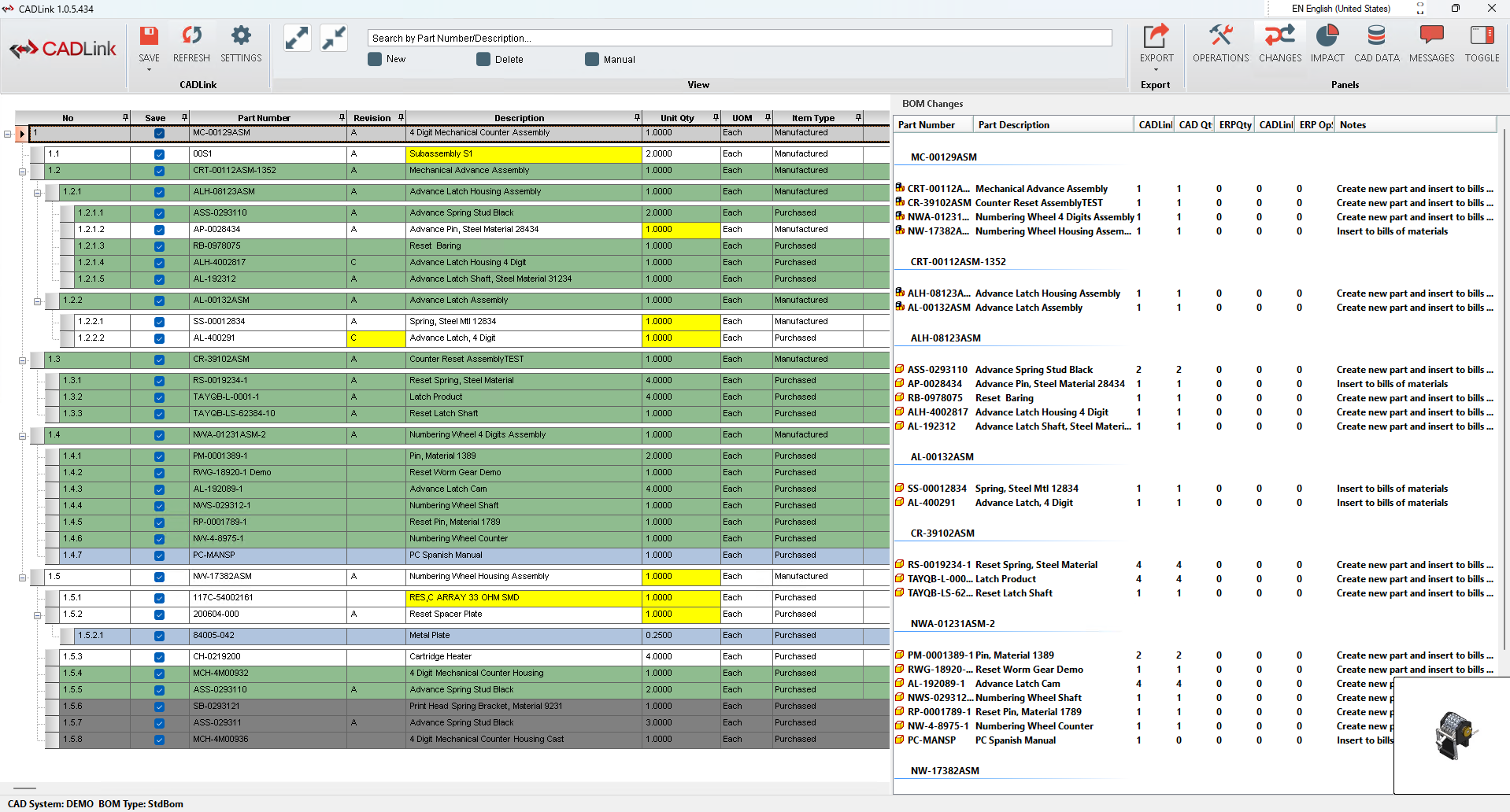
CADLink uses a real-time, bidirectional link to pull and push information from your CAD model and ERP system. Draw comparisons and make changes to two different data sets in one interface with CADLink to reduce making multiple data entries, and costly mistakes. CADLink can automatically create parts you just modeled in your item master, highlight discrepancies between the data sets and synchronize your CAD and ERP Bill of Materials in an organized and controlled way.

Whether you use Solidworks with Infor Visual Manufacturing, AutoCAD with Epicor, or SolidEdge with Dynamics AX, CADLink is able to integrate virtually any combination of CAD software and ERP system of your choice.

Overview

CADLink is a powerful CAD ERP link tool that allows your design engineers to concentrate on design work. Multiple data entry is saved through CADLink’s real-time CAD ERP link, allowing designers to access data inside ERP systems.

Key Features
  • Real time, two-way link between your CAD software and your ERP system
  • BOM and Part info interfaced directly from within
    • SOLIDWORKS, CATIA
    • AutoCAD, Inventor
    • Pro-E, Creo
    • Solid Edge, NX
    • Mentor Graphics
    • Altium Designer, etc…
  • Comparison between CAD and ERP data, with full feedback of results
  • Comprehensive Routing interface
  • Easily Integrated with QBuild’s ECx Manager
  • Full Effectivity date functionality
  • Can be integrated with any CAD, PLM or ERP system

Product Functionality

The CADLink Interface system allows engineering designers to add, modify and view ERP engineering information such as item master data, bill of material, routing data and effectivity dates.

The CAD ERP Interface system is a single application with the following functions:

Item Master Management

The Item Master contains important tombstone data such as part number, type, description, etc. The application will pull the information that exists in your ERP system and the model to populate the fields of the form. The designer will be able to modify the data on the interface form.

Pressing ‘Save’ will synchronize and update the data in both ERP system and in the CAD drawing/model.

Bill of Material Management

Bill of material information is taken directly from the assembly model or drawing to populate the fields of the CAD ERP Interface form.The engineer will not be able to add or modify bill of material information without modifying the BOM in your CAD system. Thus in order to add a part, delete a part or change the quantity on the bill of material, that part must be added, deleted or have its quantity changed in SolidWorks first and then saved through the interface.This helps to ensure data integrity between the your CAD system and the ERP system.

Pressing ‘Save’ will update the information in the ERP database with the model information, including quantity, part number, etc.

Routing Management

CAD ERP Interface optionally provides a simple, convenient interface for adding and modifying ERP routing information. The routing information is pulled from ERP and the designer can make the necessary changes in the interface.

Pressing ‘Save’ updates the ERP system with any changes made by the designer.

Effectivity Dates

The CAD ERP Interface system can include effectivity date information with the BOM. Using this option, companies can be sure to keep a clear history as well as a future instruction to production on the status of engineering bills of materials.

CAD ERP with Effectivity Dates ensures that your CAD BOM are never deleted they are only ‘zeroed’ using appropriate effective dates and quantities.

BENEFITS of CADLink

Eliminate ERP Clerical Work

With CADLink, your engineering team can focus on what they do best: Engineering. Double and triple data entries are eliminated and engineering information is input into your CAD software and your ERP system in one simplified interface. Create new items in the item master simply by having CADLink pull the data from the CAD model, and push it to the ERP.

Free up engineering staff to do more engineering and reduce your engineering costs. The less time they spend inputting data across multiple platforms, the more time they can invest on projects and designs.

Reduce Data Entry Errors

When entering data into two separate databases, there is a large possibility of discrepancies due to typos or mistakes. These are common when Engineers are tasked to fill multiple fields for every assembly, subassembly and part by hand. By unifying the data entry process, CADLink eliminates sources of error in transferring data between your CAD model and ERP system.

This is a potentially huge cost savings as a single mistake in the Bill of Materials can lead to ordering errors that result in scrap, excess inventory or late shipment of parts.

Drawing Accuracy and Consistency

The CADLink Interface ensures that the information on the drawing, descriptions and revision is identical to the information in your ERP. Accurate information in drawings eliminates confusion and reduces errors on the shop floor arising from conflicting information between work orders, sales orders and drawings. This reduces scrap and saves engineering costs in clarification.

Frequently Asked Questions

FAQs

  • What systems does CADLink integrate with?

    QBuild provides the industry’s widest range of direct connections, seamlessly linking over 50 engineering platforms (including CAD, PDM, and PLM) with over 50 major ERP and iPaaS systems. As the largest and most mature integration provider across your entire engineering ecosystem, we support everything from standard out-of-the-box setups to tailored services for custom systems. No matter your size, industry, or unique mix of software, QBuild’s unmatched breadth of experience ensures your ecosystem is fully connected. 

  • Can CADLink handle advanced ERP functionalities?

    CADLink includes deep API integrations that go beyond basic item and BOM data mapping to support advanced ERP functionalities natively. This allows you to manage complex operations like Engineering Change (EC) routing, production and quote BOMs, and full Project integration directly from the engineering environment.

  • What if my CAD BOM is structured differently from my ERP BOM?

    CADLink provides a dedicated workflow to map structural differences between CAD and ERP BOMs while maintaining the underlying data link. This ensures your custom ERP structure remains intact during future engineering revisions, eliminating the need to rebuild BOMs for Rev B. Other solutions require repeated re-structuring on each revision which can diminish the value in an automation solution.

  • Do I need a CAD license to use CADLink?

    CADLink only requires a CAD license if you would like it to be built directly into the CAD as an add-in for the design engineer. Deployment options are also available outside of the CAD, or even as fully-automated systems with no interface or user intervention.

  • How does CADLink licensing work?

    We offer both named and floating license options to match your deployment strategy. For highly automated SaaS environments, we strongly recommend named users to prevent a halt in production during peak operating hours while reducing your IT overhead/tickets in user administration.

  • Does CADLink have AI?

    Artificial intelligence is built into the CADLink logic module, giving full control to end users on how the CAD BOM is processed into ERP-ready data. You can set global rules, if-then conditions, restructure the BOM, and even control routings and raw materials. This allows CADLink to work exactly the way you need to fit your business processes without building out a custom solution. Built by engineers for engineers, we empower your team with the flexibility to tinker, optimize, and continuously improve your workflows.  

  • Does CADLink work with AI or LLMs?

    CADLink’s logic module is a rules-based AI engine that accepts VB and C# and includes full documentation, allowing you to feed it directly into LLMs like ChatGPT or Claude. This means you can generate and deploy custom routing rules in minutes rather than dozens of hours in a competitor’s proprietary system.

  • What benefits can I expect from using CADLink

    CADLink drives efficiency across your entire organization by eliminating manual data entry, allowing engineers to focus on design while automatically synchronizing items, BOMs, and routings directly with your ERP. By creating a single, reliable source of truth, it ensures manufacturing always works from the latest engineering drawings—drastically reducing shop-floor errors, scrap, and rework. Furthermore, when paired with ECx Manager, CADLink streamlines engineering change management, providing your team with total control, visibility, and auditability from initial design all the way to final production. 

  • How does CADLink handle operations/routings?

    The routing interface is built to serve anyone from high volume manufacturing, complex ETO, and mid-sized manufacturing or job shops. CADLink’s AI can automatically add routings based on rules, templates, and CAD data. You also have the option of building custom routing sequences for those unique projects your team is tackling.

  • How does support for CADLink work?

    In our unique implementation methodology you are assigned a dedicated Project Manager and Developer with engineering backgrounds, ensuring your support team actually understands manufacturing processes. This expert-level support is built directly into your standard license subscription, avoiding the typical hidden fees for technical assistance.

  • How long does CADLink take to implement?

    Implementations are rapid, and our web-based CADLink architecture can eliminate local installation time entirely. More importantly, our deployment methodology guarantees that your system is fully configured and production-ready at handoff, rather than leaving your engineering team to figure out the final setup. The same people who help you deploy will also support you after go live, creating a seamless transition into realizing value.

  • I am a large, global, and complex manufacturer. Will CADLink still work for me?

    The more complicated your manufacturing and engineering processes are, the more you stand to benefit from integration. What sets QBuild apart is the ability to scale with you. We are a one-stop shop for top-to-bottom integration, meaning we serve your needs for robust engineering change processes, nesting software integration, PLM integration, parts book generation, etc. This eliminates the need for a “rip and replace” of a different solution later as your needs grow.

Contact Us

We're not around right now. But you can send us an email and we'll get back to you, asap.

Start typing and press Enter to search