








































Autodesk Inventor vs. Autodesk Vault Integration: A Comprehensive Guide
When integrating engineering software with ERP, it’s essential to recognize the differences between Autodesk Inventor and Autodesk Vault integrations.
In this article, we’ll explore how each approach functions, along with their key benefits and considerations, to help you choose the solution that best aligns with your workflow.
Autodesk Inventor CADLink Integration
Overview
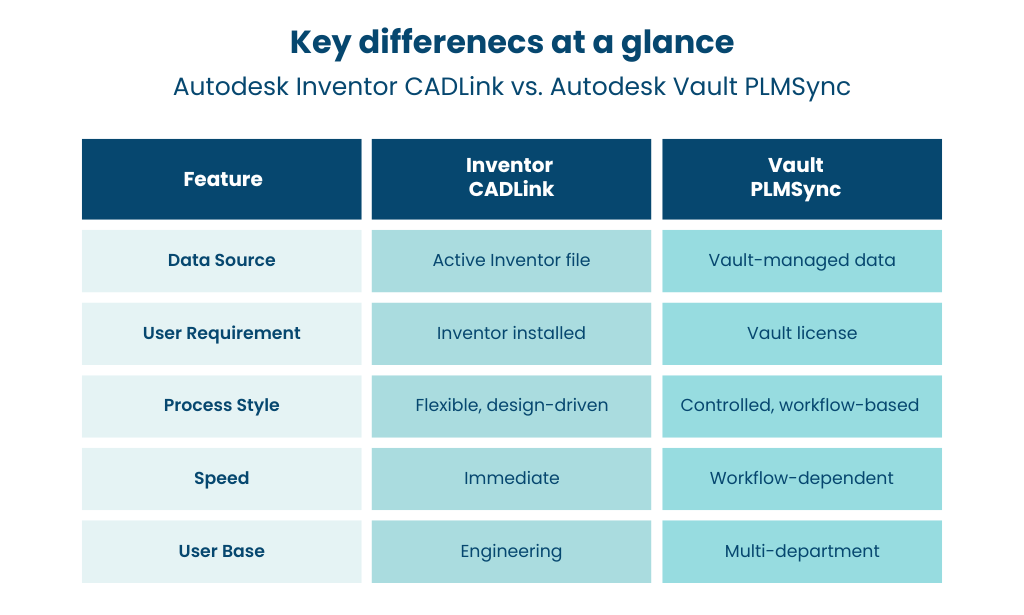
Autodesk Inventor CADLink requires Inventor to be installed on the user’s machine. This integration extracts Bill of Materials (BOM) data directly from the active Inventor assembly. It analyzes the model structure to capture component hierarchy and quantities.
All part-related data is sourced from iProperties within each file, ensuring that engineering-defined information is accurately transferred to the ERP system.
How It Works
Users can launch CADLink directly from within the Inventor interface. CADLink compares Inventor data with the ERP system and highlights any discrepancies.
As a bi-directional solution, CADLink enables data to flow both ways—allowing users to update iProperties based on ERP values.
Advantages and Considerations
Advantages
- Design-Level Control: Managed by engineers who understand the assembly structure and design intent.
- Quick Turnaround: Bypasses Vault workflows, enabling faster BOM transfer to the ERP system.
- Live Model Data: Works directly with the active Inventor file, ensuring up-to-date information.
Considerations
- Limited Standardization: Without Vault, maintaining consistent processes can be more challenging.
- Engineer Involvement: Requires engineering resources to initiate and manage the integration.
- ERP Data Gaps: Additional rules or automation may be needed to populate non-engineering fields.
Autodesk Vault PLMSync Integration
Overview
PLMSync for Autodesk Vault does not require Inventor to be installed on the user’s machine, but it does require a Vault license.
Instead of accessing the CAD file directly, this integration retrieves BOM and item data from Vault, including file properties and structured BOM records. PLMSync is able to grab the engineering data from the Vault’s Item master or directly from the Project Explorer page.
How It Works
PLMSync is initiated from within the Vault interface. It compares Vault data with ERP records and synchronizes them accordingly.
The system automatically manages file access—checking files out and back in as needed—while adhering to Vault permissions and lifecycle states.
Advantages and Considerations
Advantages
- Process Governance: Ensures that only approved and released data is transferred to the ERP system.
- Wider Access: Enables non-engineering teams to manage synchronization tasks.
- Single Data Hub: Vault serves as a centralized source of engineering data.
Considerations
- Workflow Constraints: Updates must align with Vault lifecycle states.
- Configuration Effort: Requires proper setup of Vault items, BOM structures, and permissions.
- Not Fully Real-Time: Reflects the latest data stored in Vault rather than in-progress CAD changes.
Conclusion
Choosing between Autodesk Inventor CADLink and Autodesk Vault Professional PLMSync depends on how your team operates.
Inventor integration is ideal for fast-paced environments where engineers handle data directly. Vault integration, by contrast, is better suited for organizations that rely on structured workflows and controlled data release.
With QBuild solutions like CADLink and PLMSync, you can leverage both approaches—boosting efficiency, reducing manual effort, and ensuring accurate data flow across systems.
To learn more or schedule a demo, visit our website or connect with us on LinkedIn.